Zoho Automated Lead Capture & Booking Workflow
The Same Scenario, Dozens of Industries
Picture a small business owner on a Tuesday morning. A hot lead came in overnight, but by the time they finally reply, days have passed and the customer has already booked a competitor. This isn’t an isolated mishap—it’s the daily reality for countless businesses trapped in manual, slow processes.
- Response too slow– Customer interest peaks the instant they hit submit, but manual reply times can stretch into hours or days, letting that heat dissipate.
- Information gets lost in the shuffle – Emails drown in newsletters, vendor pitches, and internal chatter; leads sink to the bottom, unseen and unacted upon.
- Manual data entry steals hours – Staff retype form details into spreadsheets or CRMs, introducing errors and delays.
- Scheduling becomes a painful back-and-forth – Phone tag and disjointed calendars push appointments further out, killing momentum.
- No pre-assessment means repeat trips – Technicians arrive without details, lack the right parts, and have to reschedule—frustrating customers and eroding trust.
- Casual cancellations drain revenue – Without deposits or commitment mechanisms, no-shows and last-minute changes disrupt the entire calendar.
At Novarra Digital, we have seen this exact scenario play out across dozens of industries. Home services, legal firms, dental practices, marketing agencies, real estate teams—the story is always the same. A contact form collects information. That information gets dumped into an email inbox. The inbox is already overflowing with newsletters, vendor pitches, and internal messages. The lead sits there, buried. Someone eventually digs it out, manually types the details into a spreadsheet or a CRM, and then starts the slow dance of scheduling a call. By the time the appointment is set, the momentum is lost.
What We Built
We built a project that completely flips this script. The goal was dead simple: make it so that the very second a potential customer submits a form, a chain of intelligent actions fires off automatically, books the meeting, stores all the critical information, and notifies the right people, without a single human being touching anything. And we did it. What makes this particular project even more powerful is the depth of information the form captures, and the clever conversion step we added right after the submit button. This isn’t just an automation that saves time. It’s a system that prepares the business owner before they ever walk out the door, and gives the customer a compelling reason to lock in their appointment permanently.
The Three Tools That Make It Possible
The foundation of this automation rests on three powerful tools working together: Zoho Forms, Zoho CRM, and Google Calendar. Zoho Forms is the front door. We embedded it directly on the business’s website, styled to match the brand perfectly. But this is no ordinary contact form. For this client, an appliance repair company, we needed to collect more than just a name and phone number. Every field on the form was chosen with one purpose in mind: to eliminate guesswork before the technician even starts the engine of the van.
What the Form Captures
Here’s what the customer fills out when they request service. First, the basics: full name, email address, and a phone number where they can be reached. Then, we dive into the appliance details. They select the appliance make from a dropdown brands like Whirlpool, Samsung, LG, and so on. Next, they type in the specific appliance model number. That little string of letters and digits is gold for a repair tech because it tells them exactly which parts and tools they’ll likely need. Then, we ask them to upload pictures of the appliance. A picture of the overall unit, maybe the serial plate, and a close up of the issue if they can capture it. The form accepts multiple image uploads right there on the spot. Below that, we have a description box where they explain what’s going wrong: “The dryer is making a loud thumping noise and won’t heat up,” or “The refrigerator is leaking water from the bottom.” And finally, without the customer doing anything extra, the form quietly captures a geotagged location. With their permission, the browser provides the GPS coordinates, which land in the CRM as a precise address and a pin on a map.
Why Granular Data Transforms the Service Call
Why all this detail? Because it lets the business perform a thorough pre assessment before the appointment. The moment the lead record is created inside Zoho CRM, the owner or the assigned technician can look at the make and model, flip through the uploaded photos, read the customer’s own description of the problem, and see exactly where the service call is located. With that information, they can determine if it’s a job they can handle, order any necessary parts ahead of time, and even estimate how long the repair might take. The geotag helps with route planning. Instead of showing up blind and spending the first twenty minutes diagnosing, the technician arrives already informed, already carrying the right parts, and ready to solve the problem. It dramatically shortens the on site time and boosts the customer’s confidence. They feel like they’re dealing with a pro who just “gets it.” That level of preparation comes entirely from the data our form captures, all of it flowing automatically into the CRM without anyone having to retype a thing.
From Submit to CRM
After the customer fills out all those fields and hits submit, the real magic starts. The data races into Zoho CRM through a direct native integration. A new lead record pops into existence. The appliance make, model, the links to the uploaded pictures, the description, and the geotagged location all map perfectly to custom fields we set up in the CRM. No copy and paste, no lost attachments, no misread handwriting. It’s all there, structured and clean. From that point, the automation workflow triggers instantly.
Smart Scheduling That Respects Real World Constraints
The system then handles the scheduling. We connected Google Calendar to the CRM so that available appointment slots are pulled in real time. If the person selected a preferred time on the form, the automation checks if that slot is open. If it is, it books it immediately. If they didn’t pick a time or their chosen slot is taken, the system assigns the next available opening based on the business’s working hours, travel buffers, and any other custom rules. For an appliance repair business, you can’t book jobs back to back across town without drive time. Our automation respects that. It leaves the right gaps. It even avoids weekends and holidays. The booking is thoughtful, not chaotic.
Instant Confirmation Emails
Once the meeting lands on the calendar, two emails fire off instantly. The lead receives a warm confirmation email with the date, time, and any preparation instructions, like “Please make sure the appliance is accessible.” It reassures them that a real technician will be there. The business owner gets an internal notification with a summary of the lead’s issue, the photos, and a direct link to the CRM record. No surprises. They can glance at their phone and know exactly what the day looks like.
The Deposit Page
But we didn’t stop there. We built one more layer into the process that turns a simple booking into a committed, qualified appointment. Right after the form submission, the customer is not left staring at a generic “Thank you” message. They are redirected to a dedicated page. This page presents them with a clear, friendly offer: pay a small deposit now to guarantee that their appointment will not be rescheduled. It explains the benefits in plain language. No confusion, no pressure. The deposit is completely optional, but the value proposition is strong. By putting down a modest amount, the customer locks in their chosen time slot permanently. The business agrees not to bump them, overbook them, or shift their appointment for any reason except a genuine emergency. It’s a two way promise that gives the customer peace of mind. They know their problem is a priority. They won’t get a call three days later saying, “Sorry, we need to move you.” For the business, the deposit does something magical: it filters out tire kickers and ensures that the people showing up on the calendar are genuinely serious about getting the repair done. It also generates a little upfront revenue that covers travel or parts, reducing the sting of a potential no show.
On that deposit page, the customer can pay via credit card or digital wallet in a secure, embedded checkout. If they decide to pay, the transaction is processed, the CRM automatically updates the lead record with a “Deposit Paid” tag and the amount, and the appointment is flagged as guaranteed. If they choose not to pay, no problem. The appointment is still on the books, just not locked. The business can decide later if they need to reschedule for a higher priority client who did pay. The whole experience feels seamless and modern, and it gives the customer a sense of control over their schedule.
The Old Way vs. The Automated Way
Now, compare all of this to the manual process this replaced. Before we stepped in, the appliance repair company was relying on a simple contact form that asked for a name, phone number, and a brief message. No photos, no geotag, no make and model fields. The receptionist would call the customer back hours later, ask all those questions over the phone, scribble notes, and then manually enter them into the CRM. Then they’d play phone tag to find a time. Then they’d have no idea what parts to bring. The technician often arrived, looked at the appliance, and said, “I’ll need to order a part. I’ll come back next week.” Customers were understandably frustrated. The business looked unorganized. And there was no deposit system at all—so last minute cancellations were common, and rescheduling was chaotic.
Our automated workflow compresses that entire mess into a sequence that runs in about five seconds. The form captures everything needed for a complete pre assessment. The calendar picks the perfect slot. The emails go out. The deposit page offers a guarantee. By the time the technician walks out the door, they’ve already studied the photos, checked the model number, grabbed the right part, and mapped the fastest route. They’re ready to fix the problem on the first visit. The customer feels heard, valued, and respected.
Visualizing the Automation Flow
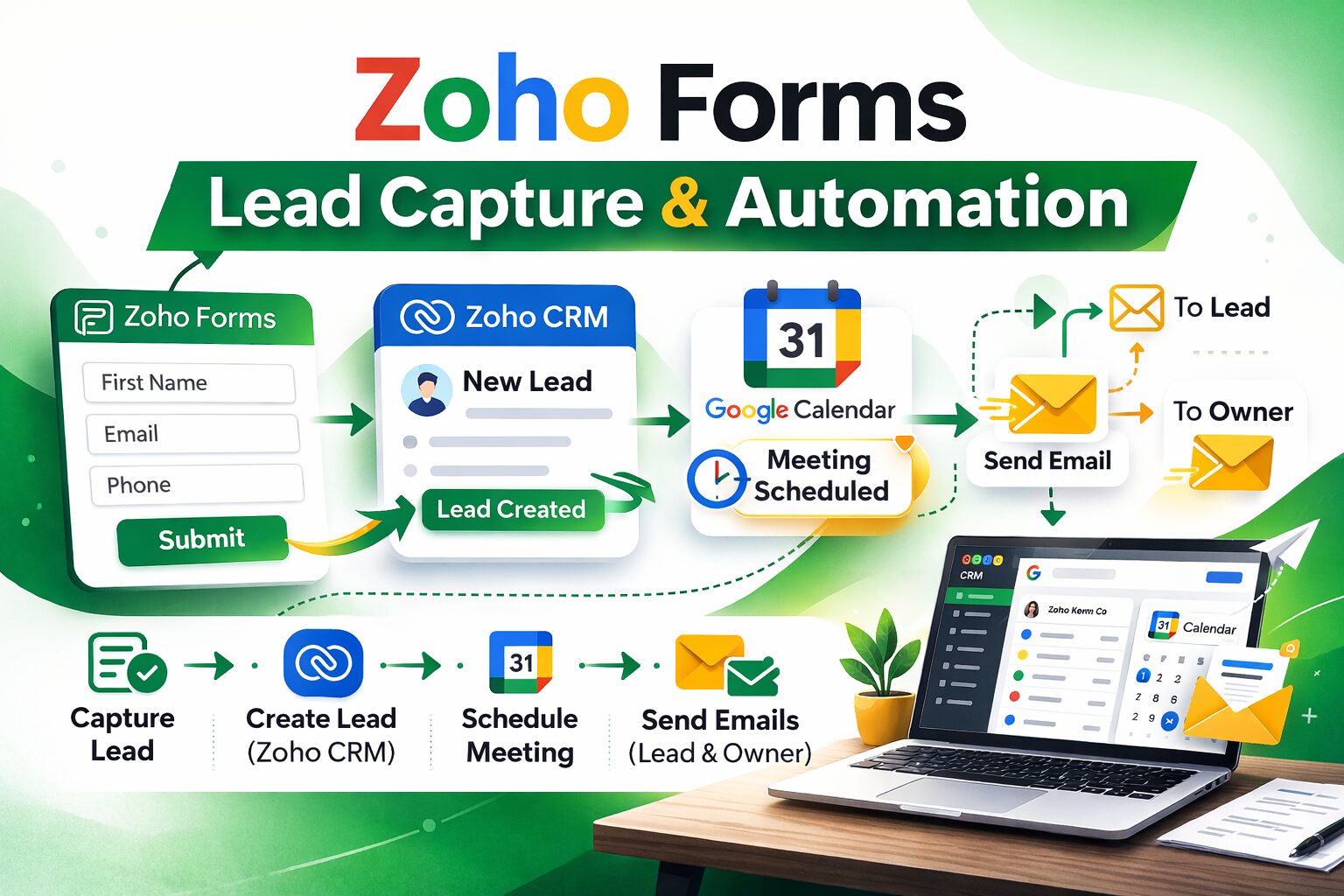
Let’s break down the technical flow in a diagram so you can see the full path, from the moment the customer lands on the form to the deposit page and beyond.
The extra step after the confirmation is that deposit page. It doesn’t interrupt the automation—it runs alongside it. The meeting is already booked, the CRM record is already populated. The deposit is a separate, powerful upsell that increases commitment.
Before and After: The Results
The results we’ve seen since launching this project have been nothing short of transformative. Let’s put some numbers to it.
Results Chart: Before vs After
| Metric | Before Automation | After Automation |
| Lead reply time | Hours (often next day) | Seconds (85 percent faster) |
| Appointments booked per month | Manually handled, often missed | 150 plus automated |
| Manual data entry | 100 percent (form to CRM by hand) | 0 percent (completely hands free) |
| Pre assessment capability | Nearly zero (no details) | Full: make, model, photos, geotag, description |
| Deposit collection | 0 percent (no option) | Available on every booking, driving higher commitment |
| Technician first visit fix rate | Low (multiple trips) | Significant increase (parts ready) |
| Owner time spent on routine tasks | Hours each week | Near zero |
Building Trust Before the First Wrench Turns
Those bottom three rows are the direct result of the detailed form fields and the deposit redirection. The business went from guessing to knowing. The pre assessment alone cut down on “I’ll have to come back” scenarios dramatically. And the deposit option added a new revenue stream that also stabilized the calendar. The owner told us, “My techs are now walking into jobs armed with the right part and a confident smile. And the customers love that we don’t waste their time.”
The brand perception improved overnight. People regularly comment on how professional the booking process feels. They take photos, they get an instant reply, they see a clear option to secure their slot, and they know the technician will arrive prepared. It builds a massive amount of trust before a single tool is lifted.
Launching in Under a Week
Implementing this didn’t require the business to rip out its existing website. We embedded the enhanced Zoho Form on their site, configured the CRM fields to match every detail, mapped the geotag to a location field, set up the file uploads, and wired the Google Calendar integration. The deposit page was built as a simple, branded checkout page connected to a payment gateway. The whole thing was live in under a week, with thorough testing to make sure the automation ran flawlessly.
Speed, Preparation, and Commitment Win
If you’re a business owner reading this, know that the technology to capture rich lead information, automate scheduling, pre assess the job, and even collect a deposit is not science fiction. It’s available right now, and it’s far more accessible than you might think. You don’t need to be a tech wizard. With the right partner, you can have a system tailored to your exact workflow so you stop losing leads, start saving hours every day, and show up to every job completely prepared.
Speed wins. Preparation wins. Giving the customer a way to commit and feel secure wins. This project took a reactive, leaky, stressful process and turned it into a proactive, smooth, revenue generating machine. The owner went from drowning in admin to dominating their local market. And that’s exactly the kind of transformation we deliver at Novarra Digital, one smart automation at a time.
Stop Letting Hot Leads Slip Away
Every day you wait, another hot lead slips through your fingers. Another potential customer feels ignored and moves on. You leave the house without the right part, make two trips, and burn fuel and reputation. It doesn’t have to be that way. The combination of a deeply insightful Zoho Form, Zoho CRM, Google Calendar, and a strategic deposit page can give you back your time, your sanity, and your bottom line. You’ve already done the hard work of getting people to your site. Now let the machines handle the rest, so you can do what you do best: show up informed, connect with confidence, and fix the problem on the first try.